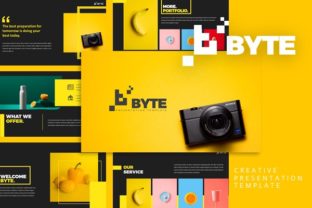
Byte Creative Presentation Template: Design Made Simple
Presenting ideas clearly and creatively matters more than ever. Whether you're pitching a business plan, teaching a workshop, or sharing a portfolio, your visuals need to match the quality of your content. The Byte Creative Presentation Template gives you a powerful, flexible starting point to build presentations that stand out—without starting from scratch.
With 50 slides in both light and dark versions, this template offers a broad visual foundation. Every slide is built using Master Slides, ensuring consistency across your presentation. Whether you're a designer, marketer, educator, or entrepreneur, you'll find the structure intuitive and easy to customize for your specific needs.
What Makes Byte Creative Unique?
At its core, the Byte Creative Presentation Template is designed for flexibility and visual clarity. Here's what sets it apart:
- Handcrafted Infographics – Visual data that’s easy to edit and fits seamlessly into your message.
- Pixel-Perfect Illustrations – Crisp, clean visuals that maintain quality at any scale.
- Resizable and Editable Graphics – Adjust visuals to fit your layout without losing quality.
- Picture Placeholders – Drag-and-drop image slots that make updating visuals fast and intuitive.
- Gallery and Portfolio Slides – Perfect for creatives and entrepreneurs looking to showcase work.
Each template comes in both light and dark themes, allowing you to match your brand or presentation environment. Whether you're presenting in a bright boardroom or a dimly lit studio, the right theme can enhance readability and audience engagement.
How to Use Byte Creative for Different Goals
This template isn’t just for one type of presentation. It adapts well to a wide range of uses and audiences. Here are a few ways different users can benefit:
For Designers and Creatives
Use the gallery and portfolio slides to showcase your work. Customize the layout to highlight your best projects. The included vector icons and illustrations help maintain a professional look without needing to source visuals elsewhere.
For Marketers and Entrepreneurs
Build compelling pitch decks with clean, data-driven infographics. The template’s structure supports clear storytelling—ideal for startup pitches, product launches, or campaign overviews. You can also export slides into social media visuals or PDF reports for follow-ups.
For Educators and Trainers
Create engaging lesson plans, workshop materials, or training decks. The organized slide structure helps maintain flow, and the editable graphics make it easy to explain complex ideas visually.
For Bloggers and Content Creators
Turn your written content into presentation format for speaking engagements or online courses. Use the template to visually summarize key points, making your ideas more digestible and shareable.
Creative Possibilities and Customization Tips
While the template is already well-designed, its real strength lies in how easily it can be adapted. Here are a few creative directions and tips for getting the most from it:
- Brand Consistency – Replace default colors and fonts with your brand assets to keep your presentation on-brand.
- Theme Mixing – Combine light and dark slides strategically—use dark themes for dramatic visuals and light themes for detailed content.
- Visual Storytelling – Use the infographic slides to break down complex processes or data into digestible visuals.
- Interactive Elements – Add clickable elements or animations (if supported) to guide your audience through the flow.
Don’t feel limited by the default layouts. Rearranging slide elements or combining sections can lead to fresh, original designs that reflect your unique style.
Getting Organized: How to Keep Your Presentation Clear
A visually appealing template is only effective if your message is clear. Here’s how to stay organized and audience-focused:
- Start with an Outline – Know your key points before choosing slides. This avoids clutter and keeps your message focused.
- Limit Text – Use short phrases and keywords. Let your visuals and spoken words carry the details.
- Use Visual Hierarchy – Make sure the most important information stands out visually.
- Test Your Flow – Walk through your slides to ensure transitions make sense and build naturally on each other.
Remember, your audience is there to understand your message—not decipher your slides. Keep your design clean, your visuals relevant, and your message front and center.
Real-World Examples and Ideas
Let’s look at how different professionals can use the Byte Creative Presentation Template in practical ways:
Case Study: A Freelance Photographer
Used the gallery slides to build a portfolio deck for client meetings. They customized the dark theme to highlight black-and-white shots and used the light theme for color series. The result? A professional, easy-to-update presentation that impressed potential clients.
Case Study: A Startup Founder
Built a pitch deck using infographic slides to show market size, growth projections, and team structure. They mixed light and dark slides to separate financial data from team and product visuals. The structured layout helped them communicate complex ideas clearly during investor meetings.
Case Study: A UX Designer
Used the template to walk through a redesign process. They customized slides to include before-and-after visuals, user flow diagrams, and research summaries. The handcrafted illustrations helped explain abstract concepts without needing additional design work.
Final Thoughts: Make It Your Own
The Byte Creative Presentation Template is more than a set of slides—it’s a toolkit for visual communication. Whether you're presenting to a small group or a large audience, having a well-structured, adaptable design foundation can make all the difference.
Take the time to explore both the light and dark versions. Experiment with slide combinations. Replace placeholders with your own visuals and data. Most importantly, use the template to support your message—not the other way around.
With the right approach, you’ll not only save time—you’ll also create presentations that are more engaging, professional, and memorable.